What's new
A better Sleip
A major update to Sleip is here, with improved navigation, a refreshed design and new ways to make everyday work smoother. This includes flexion tests, improved horse management and on-device processing for situations where your internet connection is limited.


Everything stays with you
All your horses, recordings and analyses will still be there. The update brings a new experience and new functionality, without changing access to your existing data.

The new version will start rolling out in October. On-device analysis will follow a gradual rollout and may not be available immediately when you update..

Scroll down for a first look at the new design, navigation and features.
Two smartphone screens showing a Sleip app interface. The left screen displays recent activity with analysis results The right screen shows a user profile with a circular photo of Sarah Mitchell, her account details including email, name, password options, subscription details. Both screens have navigation icons at the bottom for Home, Horses, and Search.
New
Home & settings
We're introducing a new home screen, where you'll find your most recent analysyses as well as all user guides, to help you get the most out of Sleip.

Tap the settings icon in the top right to manage your account and explore new app settings. Add a profile image to make your home screen your own.
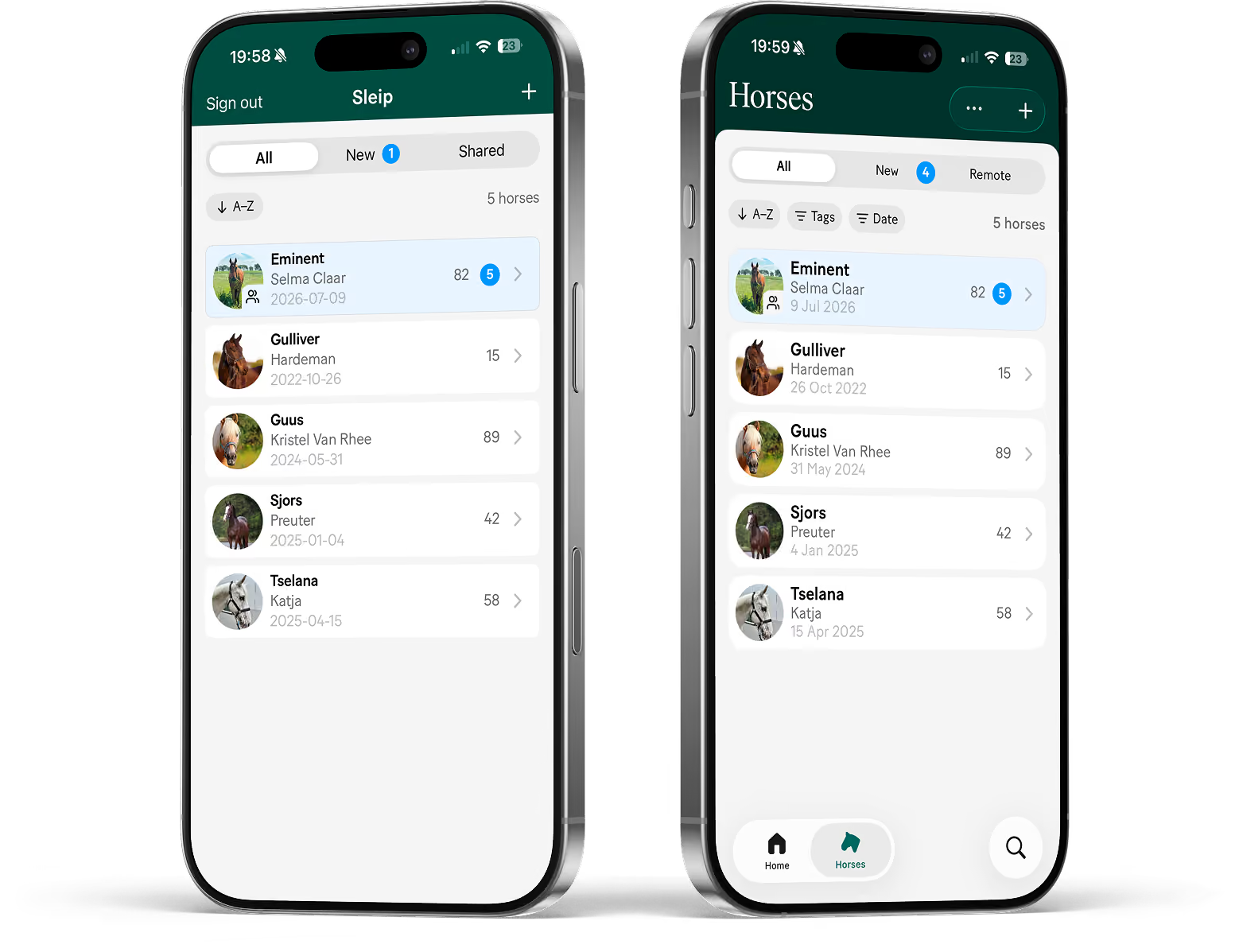
Two mobile phone screens displaying a list of horses. The left screen lists six horses with names, owners, and dates; Eminent is highlighted with 4 notifications. The right screen shows the same list with a filter and sort menu overlay offering options to mark all as read, sort alphabetically or by recent, filter by tags or date, merge horses, and delete horses.
Horses
Find a specific horse or analysis result faster — filter by date or using your own tags. You can aslo tap the new search button in the bottom right to search by Horse name, owner or ID.

The more menu (•••) in the top right adds options that change depending on where you are in the app. Use Merge horses if you have recorded the same horse under duplicate horse profiles.
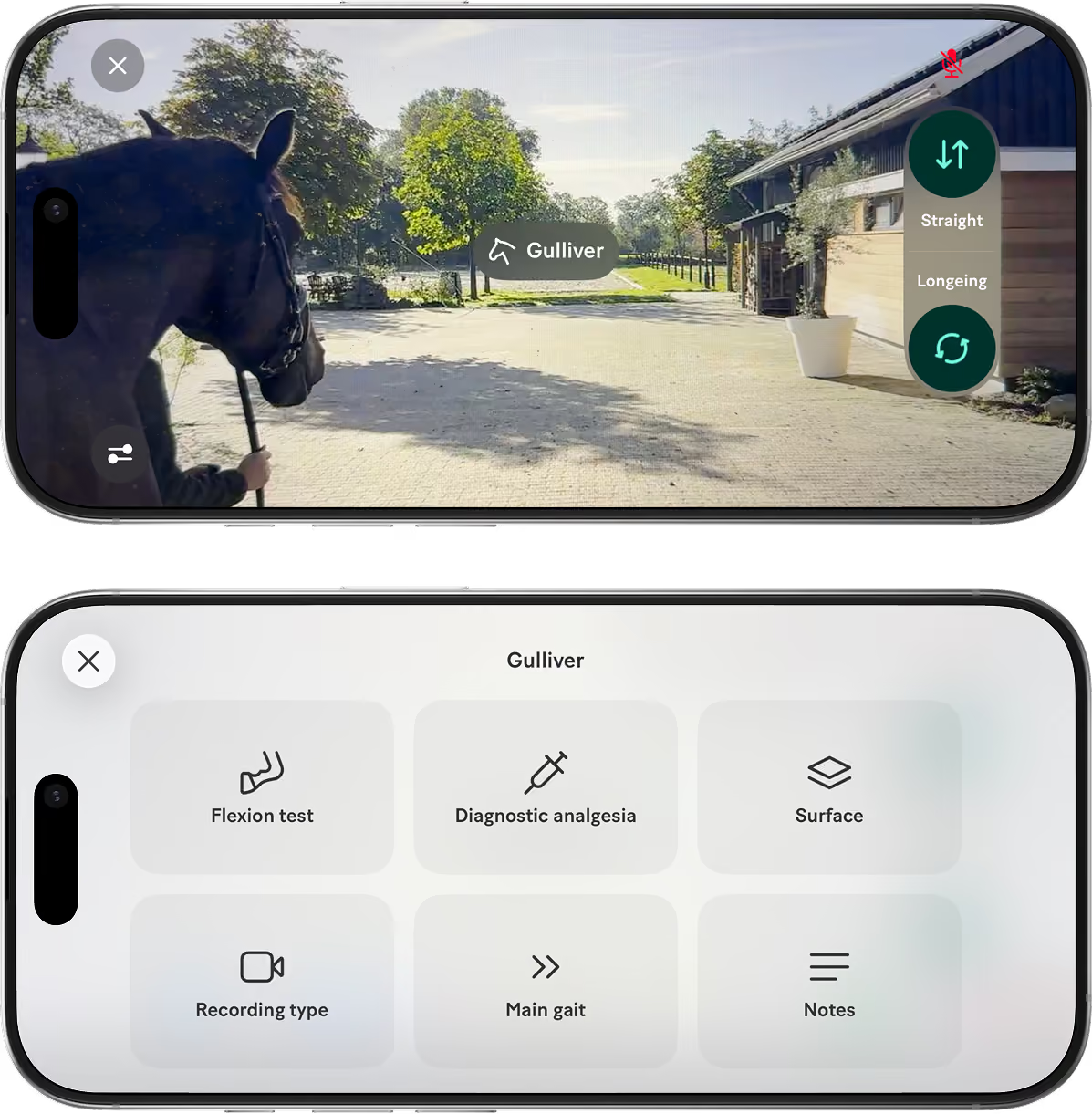
Two smartphone screens showing a recording view with a horse named Gulliver and an app interface for equine assessment with options including Flexion test, Diagnostic analgesia, Surface, Recording type, Main gait, and Notes.
New
Recording
‍Horse and recording type
The name in the middle is the horse you're about to record. Wrong one? Tap it to change, without leaving the view. Select straight-line or longeing recording without having to go back to portrait orientation.

‍Add details
You can add details to your recording before you start it. Tap the settings icon in the bottom left to add notes, diagnostic analgesia, flexion, surface and more — so the context is attached from the first frame.
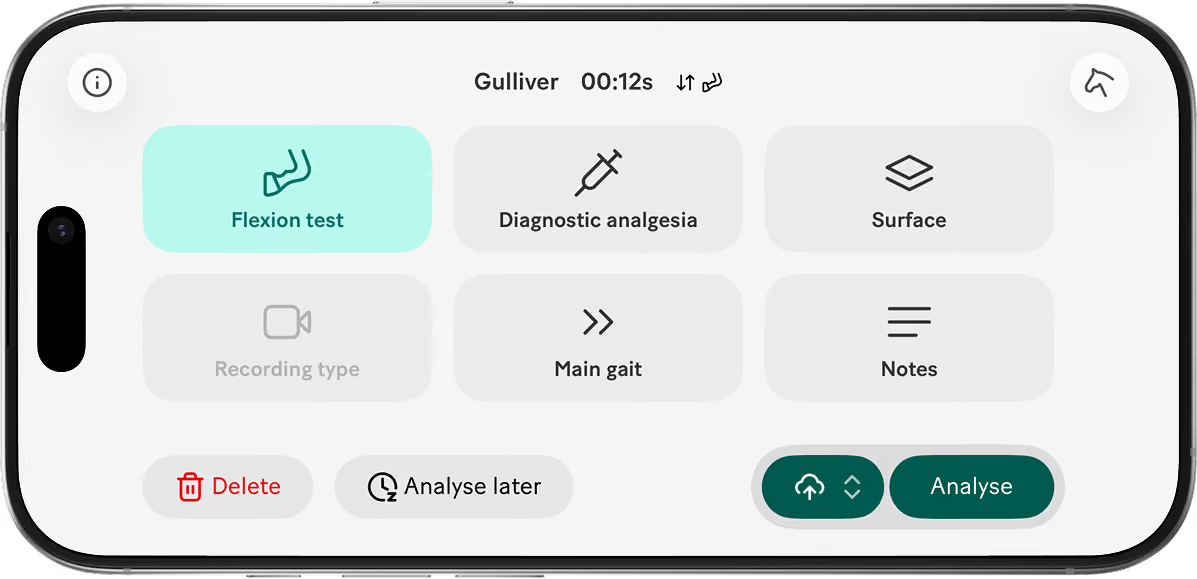
Smartphone screen displaying the Sleip app interface with options including Flexion test, Diagnostic analgesia, Surface, Main gait, and Notes; Flexion test is highlighted. There are buttons for Delete in red, Analyse later, and a green Analyse button.
New
Analyse your recording
You can still add or change notes, analgesia/flexion and other details before analysing it, if you didn't set them before recording.

Recorded the wrong horse?
No problem — tap the horse icon in the top right and switch to the correct one.

Select how to analyse
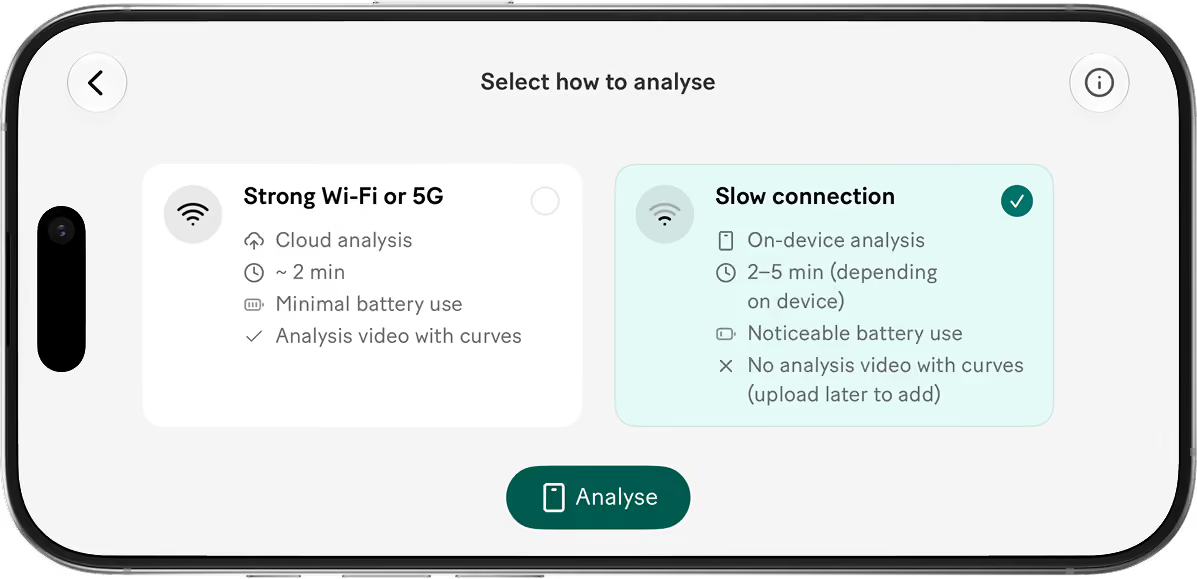
Tap the selector next to the Analyse button and choose how to process your recording — cloud or on-device.
Smartphone screen displaying options to select how to analyze with two choices: 'Strong Wi-Fi or 5G' (Cloud analysis) and 'Slow connection' (On-device analysis).
Slow internet connection?
Analyse on-device
On-device analysis mode lets you process recordings directly on your phone when internet access is unreliable — useful for ambulatory work, rural visits or anywhere with a poor connection. Some connectivity is still required, so it won’t work in flight mode.

Analysis results are available on your device within minutes. The slow-motion analysis video with synchronised stride curves becomes available after you upload the recording on a stronger connection.

Device requirements
For on-device analysis we recommend iPhone 16 or later. Cloud analysis is still recommended when you have a good connection. It also uses less battery on your device.

Rolling out gradually
On-device analysis may not be available to everyone from day one. If you don’t see the option yet, it will become available when the rollout reaches you
Two smartphone screens showing Video and Details screens
Analysis results
Videos
The original video and analysis video now both live in the Video tab.

Details
Notes, analgesia, flexion, surface can all be edited under the Details tab.
You can now also move a recording to a different horse.
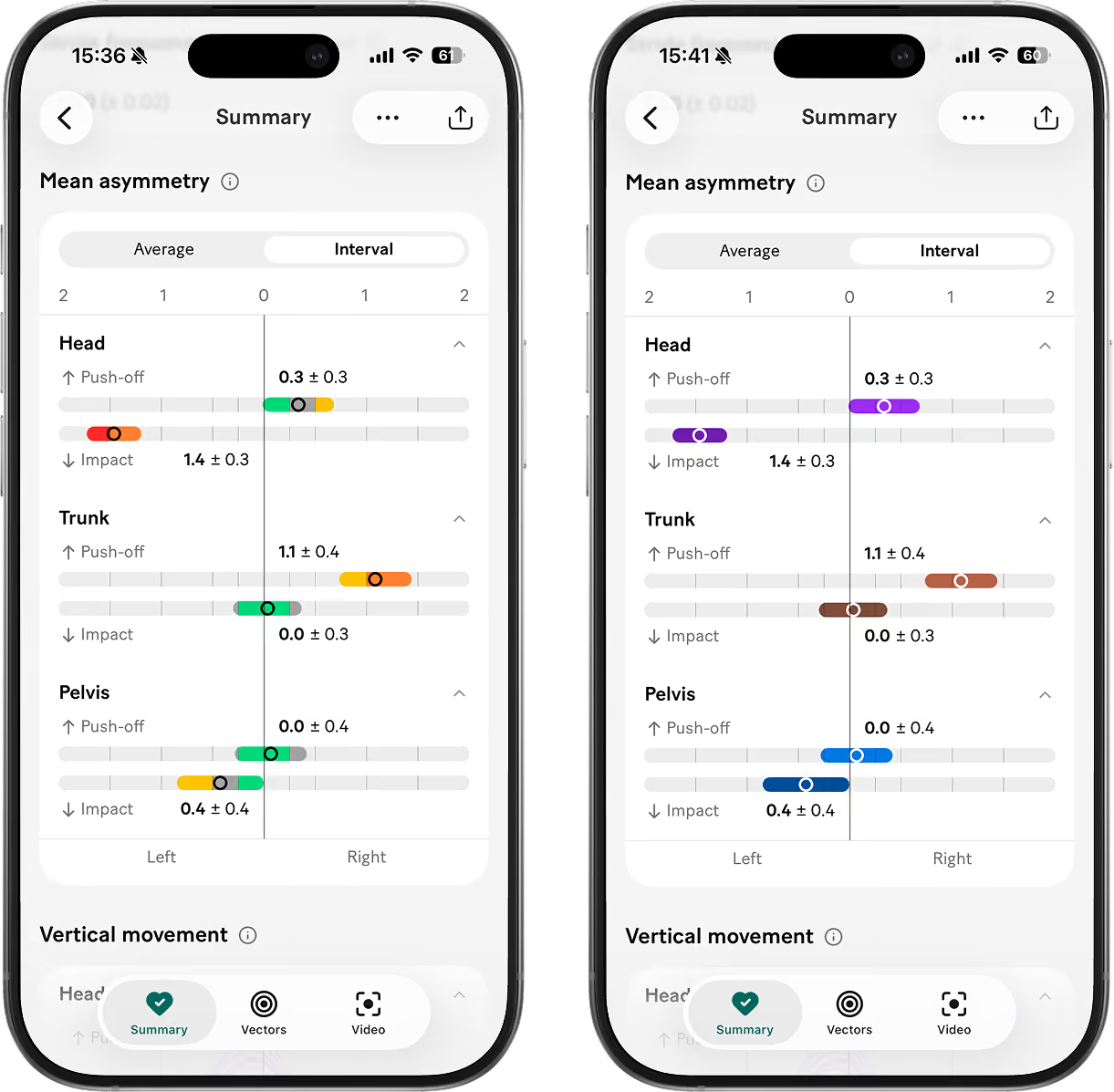
Two smartphones side by side displaying 'Analysis Summary' showing mean asymmetry data with interval graphs for Head, Trunk, and Pelvis, detailing push-off and impact values with colored bars and numerical values for left and right sides.
New
Asymmetry colours
Prefer to see your results without color cues? You can now turn off asymmetry coloring (red, orange, yellow, gray, green) for a more neutral interpretation with colors for head, trunk and pelvis.

Set your default preference in app settings and change it temporarily in the thrre dot menu, when needed.

We’ve also added a whole range of smaller improvements, including values for the mean asymmetry bars and a new interval view showing the confidence range for each value.
New
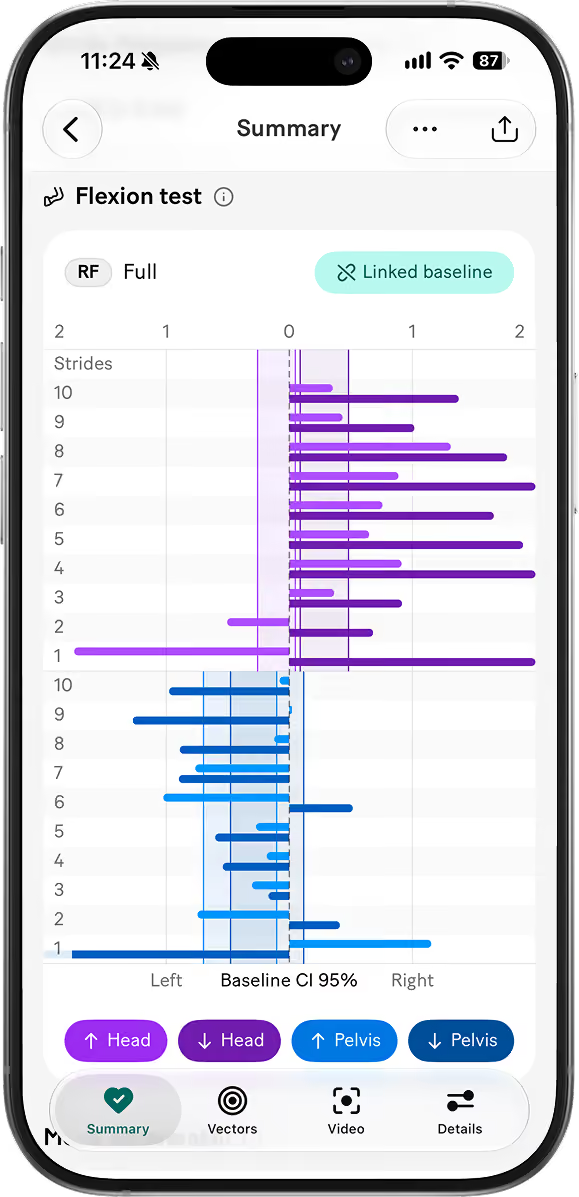
Flexion test analysis
Record and label flexion tests in Sleip, then compare them with a baseline from the same session. Link the baseline once, and Sleip applies it to the other flexion tests in that session.
Two smartphone screens showing new share options in the Sleip app. Share link, PDF or Horse (with another SLeip Pro Vet or Pro user).
New
Share results. Share horses.
You can now not only share analysis results as link or PDF — you can also share the horse with another Sleip Pro Vet or Sleip Pro user to collaborate in the app.

While the horse is shared, they can access existing and future analyses, add recordings and update the horse profile. If you stop sharing the horse, their access to both past and future analyses is removed.